OpenAI Now Charges 40% Less If Your Agent Can Wait Eight Hours. Sort Your AI Work by Deadline, Not by Model

By Surya Pratap
November 23, 2026
8 min read
AI & Technology

November 23, 2026
8 min read
 See what each deadline costsHover to explore
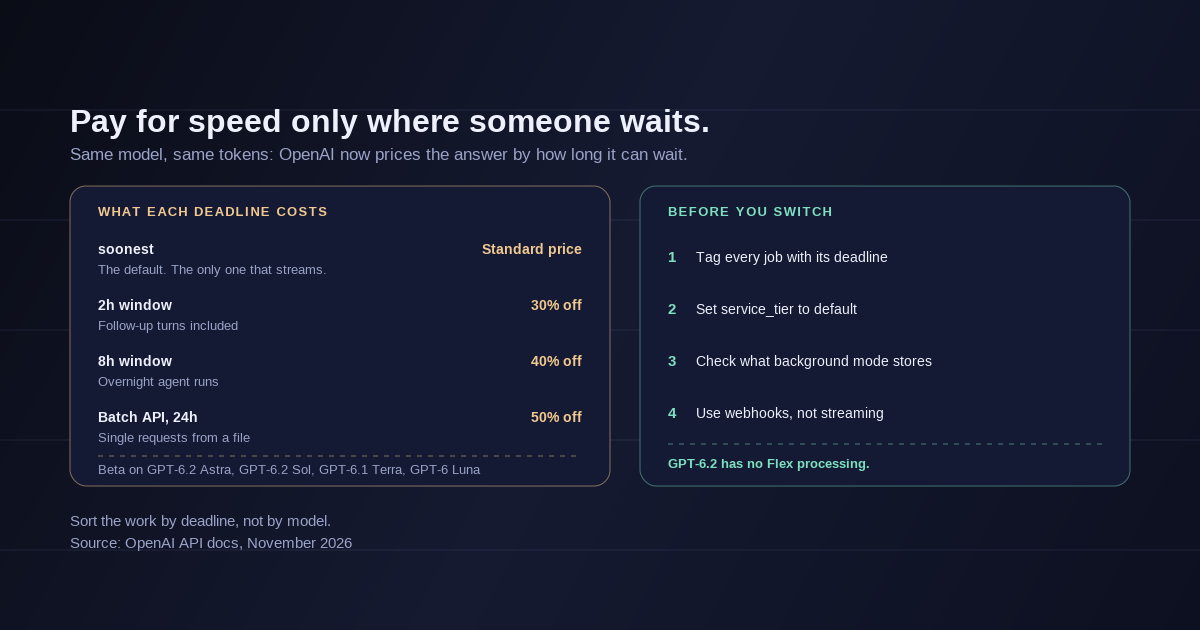
Most AI products pay one price for every token, whether a user is watching the answer appear or a nightly job will read it tomorrow morning. OpenAI now sells waiting. If a request can take up to two hours, its tokens cost 30% less. If it can take up to eight, they cost 40% less. For a startup whose biggest AI bill is agents doing work nobody is watching, that may be the largest saving available this quarter without changing the model.
Background mode in the Responses API already let you start a long request and collect the result later. It now takes a deadline:
background_options.completion_window to soonest (the default), 2h or 8h. For the last two, "the API targets completion within the selected window after it accepts the request."soonest has no discount.Per million tokens, short context, from OpenAI's pricing page. The 2-hour and 8-hour figures are my arithmetic from the stated discounts; OpenAI publishes the percentages, not these rows.
| Input, GPT-6.2 Sol | Output, GPT-6.2 Sol | Input, GPT-6.2 Astra | Output, GPT-6.2 Astra | |
|---|---|---|---|---|
Standard (soonest) | $2.00 | $10.00 | $8.00 | $40.00 |
| Background, 2-hour window | $1.40 | $7.00 | $5.60 | $28.00 |
| Background, 8-hour window | $1.20 | $6.00 | $4.80 | $24.00 |
| Batch API, 24-hour window | $1.00 | $5.00 | $4.00 | $20.00 |
Take a nightly job that reads 2,000 support tickets, at 20,000 input tokens and 2,000 output tokens each: 40 million tokens in and 4 million out. On GPT-6.2 Sol that costs about $120 at Standard, $84 in a 2-hour window, $72 in an 8-hour window and $60 through the Batch API. On Astra, multiply each figure by four. Run it every night and the gap between Standard and an 8-hour window is about $1,400 a month on Sol alone.
The Batch API is still cheaper. It also works differently. You upload a file of independent requests, wait up to 24 hours, and download a file of answers. That suits one-shot work: classify these, summarise those. It does not suit an agent, which calls a tool, reads the result, and decides what to do next, turn after turn.
Background windows are built for that loop. You keep the same model, service_tier, window and continuation_id across turns, and OpenAI says reusing them qualifies the follow-ups "for higher queue priority." Each turn is billed at the discount. So the realistic comparison is not Batch against background. It is a research agent, a codebase migration or an overnight data-cleaning run at Standard prices, against the same run at 30% or 40% less.
The Batch API discounts single requests. Background windows discount the whole agent run.
The lower price comes with conditions. Each of them is in OpenAI's guide, and each one can break something that works today:
2h and 8h, "leave stream unset or set it to false." Anything a user watches being typed belongs in soonest.service_tier to default." With auto, the request "qualifies only if the API selects Standard."2h or 8h windows "share the Batch/Background Rate Limit with Batch API jobs." If you already run large batches, the new background traffic competes with them for the same queue.2h or 8h background requests." Moving half a workload to a window can lower its cache hit rate.store to false or use Zero Data Retention." OpenAI encrypts it at rest. But if a customer contract promises zero retention, read it again before you move that customer's traffic.# overnight_job.py — run an agent step in the 8-hour window
from openai import OpenAI
client = OpenAI()
resp = client.responses.create(
model="gpt-6.2-sol",
input=build_prompt(ticket_batch), # your own prompt builder
background=True,
background_options={"completion_window": "8h"}, # 40% below Standard
service_tier="default", # discount needs Standard processing
# no stream=True: discounted windows don't stream
)
save_pending(resp.id) # finish it when the response.completed webhook arrives
Tag every job with its deadline. Before choosing a window, list your AI workloads and write down when each answer is actually needed. Chat and anything a user waits for: now. A report emailed in the morning: eight hours. A document processed on upload but read the next day: two hours, or eight.
Use the Batch API for single requests. If a job is thousands of independent prompts with no tool calls, Batch is still 50% off and runs for up to 24 hours. Keep background windows for multi-turn work, where Batch does not fit.
Switch to webhooks, not polling loops. Subscribe to response.completed, and to failed, incomplete and canceled events. Verify the signature, fetch the response by its ID, and deduplicate on the webhook-id header. Your code has to accept answers arriving hours later.
Measure the result, not the price list. Track cost per finished task before and after the move. Check whether prompt-cache hits fell, whether the shared rate limit delayed your batches, and how often a window ran long. The saving is what remains after all three.
If you use Flex processing today
Flex is being wound down. OpenAI says Flex "is unavailable on GPT-6.2 Astra and GPT-6.2 Sol, and we won't be adding it to future models." Flex is priced at Batch rates, so moving Flex traffic to GPT-6.2 means going from 50% off to at most 40% off in an 8-hour window. Count that in when you compare models. We worked through the choice between the two new models in GPT-6.2 Astra or Sol.
What happens when a window is missed. The guide says the API "targets" the window. It does not say whether a late response is still discounted, cancelled or expired. Until OpenAI says, treat the window as a target and build for late answers.
How long background data is kept. The guide says data is stored temporarily and encrypted, and links to OpenAI's data controls. It does not give a duration on that page.
That other models are eligible. The documentation lists four models. Forum replies suggest the windows work elsewhere, but I would rely only on the documented list, and check your invoice.
That the beta terms are final. Discounts, models and limits can change before general availability.
OpenAI's background mode now takes a completion window. In a 2-hour window, model tokens cost 30% less than Standard; in an 8-hour window, 40% less, and the discount applies to every follow-up in a multi-turn agent run. It is in public beta on GPT-6.2 Astra, GPT-6.2 Sol, GPT-6.1 Terra and GPT-6 Luna. Discounted requests cannot stream, need service_tier set to default, share a rate limit with the Batch API, use a prompt cache that Standard requests cannot reuse, and store data temporarily even under Zero Data Retention. The Batch API remains the cheapest option for single requests, and GPT-6.2 has no Flex processing.
Most startups pay for speed on work that nobody is waiting for. The new windows put a price on that habit.
This week, list your AI workloads by when each answer is really needed, move the overnight agent work to an 8-hour window, and keep the Standard price for the requests a person is watching.
Sources: OpenAI, Background mode guide — the soonest, 2h and 8h completion windows, the 30% and 40% discounts, the eligible models and public beta status, the service_tier requirement, streaming, the shared Batch/Background rate limit, prompt cache reuse, follow-ups and continuation_id, webhooks, and temporary data storage under Zero Data Retention. Pricing — Standard and Batch prices for GPT-6.2 Sol and GPT-6.2 Astra, and the discount wording. Flex processing guide — the wind-down of Flex and its absence from GPT-6.2. Batch API guide — the 50% discount and 24-hour window. OpenAI developer forum, announcement of 19 November 2026. All checked on 23 November 2026. The 2-hour and 8-hour prices, the cost examples and the reading in sections 3 to 6 are mine.
IdeaToMVP Academy
4-week live cohort for founders. Learn to ship AI agents, scope MVPs, and automate your business — taught by the same team that writes these guides.