CrewAI vs LangGraph vs AutoGen: Which Multi-Agent Framework to Use in 2026

By Surya Pratap
March 29, 2026
16 min read
Agent Orchestration · Framework Comparison

March 29, 2026
16 min read
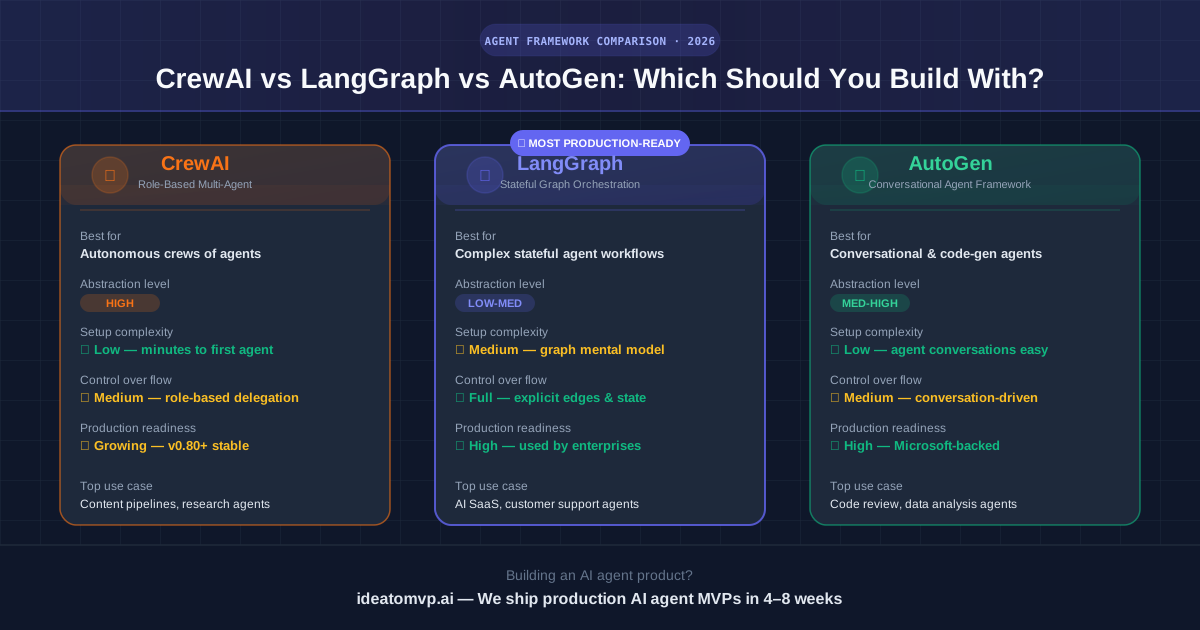
Every founder building an AI product right now asks the same question: which agent framework should I actually use? CrewAI has the most GitHub stars. LangGraph is what enterprise teams ship to production. AutoGen is Microsoft's bet on conversational agents. They all claim to solve multi-agent orchestration — but they solve it very differently.
This article cuts through the hype. We'll look at the architecture of each framework, show real code for the same use case in each, and give you a clear decision framework so you pick the right tool before you build — not after six weeks of the wrong one.
TL;DR
All three frameworks exist to answer the same question: how do you coordinate multiple AI agents so they work together without chaos? But their mental models are completely different:
CrewAI
Role delegation
“A crew with a captain”
You define agents with roles, goals, and backstories. A manager agent delegates tasks to specialist agents. The crew works sequentially or in parallel toward a shared goal.
LangGraph
State machine graph
“A directed workflow”
You define nodes (functions/agents) and edges (transitions). A typed state dict flows through the graph. Every step is explicit, every transition is controlled.
AutoGen
Conversation protocol
“Agents talking to agents”
You define agents that send messages to each other. A group chat manager routes conversations. Agents reply, revise, and converge through natural language exchange.
CrewAI is the fastest way to go from zero to a working multi-agent demo. The abstraction is high — you describe what agents do in plain English, assign them tools, and let the framework handle orchestration. For content pipelines, research workflows, and early prototypes, this is genuinely powerful.
from crewai import Agent, Task, Crew, Process
from crewai_tools import SerperDevTool

search_tool = SerperDevTool()

researcher = Agent(
    role="Senior Research Analyst",
    goal="Find the latest market trends in AI agent frameworks",
    backstory="You are an expert at discovering cutting-edge tech trends.",
    tools=[search_tool],
    verbose=True,
)

writer = Agent(
    role="Tech Content Strategist",
    goal="Write a concise summary report from the research",
    backstory="You distill complex technical research into founder-friendly insights.",
    verbose=True,
)

research_task = Task(
    description="Research the top 3 AI agent frameworks in 2026 and their adoption trends.",
    expected_output="A bullet-point brief with key stats and GitHub star counts.",
    agent=researcher,
)

write_task = Task(
    description="Turn the research brief into a 300-word executive summary.",
    expected_output="A polished executive summary ready for a VC update.",
    agent=writer,
)

crew = Crew(
    agents=[researcher, writer],
    tasks=[research_task, write_task],
    process=Process.sequential,
    verbose=True,
)

result = crew.kickoff()
print(result)
Notice the abstraction: you never define how the researcher talks to the writer — CrewAI handles that. This is the framework's superpower and its limitation. You're trading control for speed.
Where CrewAI wins
Where CrewAI struggles
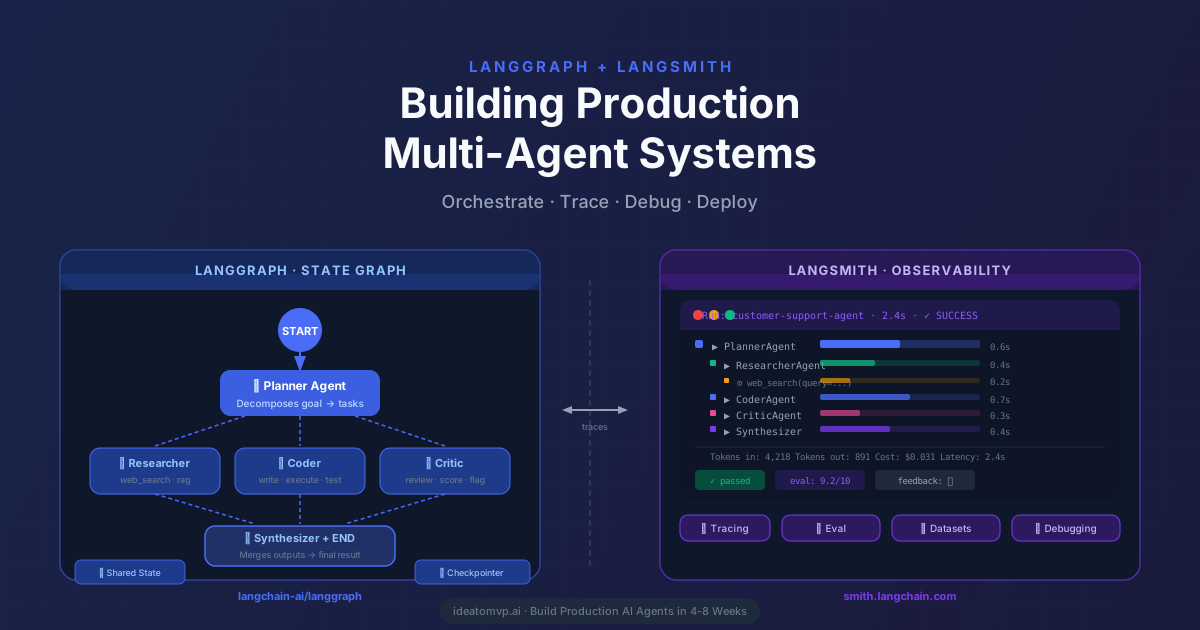
LangGraph is built by the LangChain team specifically for stateful, cyclic agent workflows. Instead of hiding the orchestration, it exposes it as a graph you control explicitly. Every node is a function. Every edge is a transition. State is a typed dict that persists across the entire run — including across API calls, across human interruptions, and across retries.
Here's the same research-to-summary task, but in LangGraph — now with explicit state tracking, conditional routing, and human approval before the final output:
from typing import TypedDict, Annotated
from langgraph.graph import StateGraph, END
from langgraph.checkpoint.memory import MemorySaver
from langchain_openai import ChatOpenAI
from langchain_core.messages import HumanMessage

llm = ChatOpenAI(model="gpt-4o", temperature=0)

# 1. Define the state schema — everything that flows through the graph
class ResearchState(TypedDict):
    query: str
    research_notes: str
    draft_summary: str
    approved: bool
    final_output: str

# 2. Define nodes (each is a pure function that receives and returns state)
def research_node(state: ResearchState) -> ResearchState:
    """Simulate research — in production, call a search tool here."""
    response = llm.invoke([
        HumanMessage(content=f"Research this topic and return key bullet points: {state['query']}")
    ])
    return {"research_notes": response.content}

def write_node(state: ResearchState) -> ResearchState:
    """Write a summary from the research notes."""
    response = llm.invoke([
        HumanMessage(content=f"Turn these notes into a 300-word executive summary:
{state['research_notes']}")
    ])
    return {"draft_summary": response.content}

def approval_node(state: ResearchState) -> ResearchState:
    """Human-in-the-loop checkpoint — graph pauses here until approved."""
    # In LangGraph Cloud / production, this triggers an interrupt
    # and waits for a human to call graph.update_state() with approved=True
    print(f"
--- DRAFT FOR REVIEW ---
{state['draft_summary']}
")
    return {}  # State update happens externally

def finalize_node(state: ResearchState) -> ResearchState:
    """Finalize the approved draft."""
    return {"final_output": state["draft_summary"]}

# 3. Route based on approval status
def should_finalize(state: ResearchState) -> str:
    return "finalize" if state.get("approved") else "approval"

# 4. Build the graph
builder = StateGraph(ResearchState)
builder.add_node("research", research_node)
builder.add_node("write", write_node)
builder.add_node("approval", approval_node)
builder.add_node("finalize", finalize_node)

builder.set_entry_point("research")
builder.add_edge("research", "write")
builder.add_conditional_edges("write", should_finalize)
builder.add_edge("approval", END)   # Waits for external approval
builder.add_edge("finalize", END)

# 5. Compile with a checkpointer (enables persistence + human interruption)
checkpointer = MemorySaver()
graph = builder.compile(
    checkpointer=checkpointer,
    interrupt_before=["approval"]
)

# 6. Run
config = {"configurable": {"thread_id": "run-001"}}
result = graph.invoke({"query": "Top AI agent frameworks in 2026", "approved": False}, config)
print("State after write:", result)
The difference from CrewAI is significant. You can see exactly where the graph pauses for human input. You can inspect the state at any node. You can resume from a checkpoint after a failure. This is what production requires — not just a prototype.
Where LangGraph wins
Where LangGraph struggles
AutoGen (now AutoGen 0.4 / AG2) is Microsoft Research's framework for multi-agent conversations. The core metaphor is agents as conversational participants. Agents send messages, respond to each other, and converge through dialogue. It excels at code-generation tasks, debugging loops, and any workflow that benefits from iterative back-and-forth.
import asyncio
from autogen_agentchat.agents import AssistantAgent, UserProxyAgent
from autogen_agentchat.teams import RoundRobinGroupChat
from autogen_agentchat.conditions import MaxMessageTermination
from autogen_ext.models.openai import OpenAIChatCompletionClient

# Model client
model_client = OpenAIChatCompletionClient(model="gpt-4o")

# Define agents
researcher = AssistantAgent(
    name="Researcher",
    model_client=model_client,
    system_message=(
        "You are a research analyst. When given a topic, find key facts "
        "and return bullet-point notes. Be concise and factual."
    ),
)

writer = AssistantAgent(
    name="Writer",
    model_client=model_client,
    system_message=(
        "You are a content strategist. When given research notes, write "
        "a 300-word executive summary. End your message with TERMINATE."
    ),
)

# Group chat: agents take turns in round-robin order
team = RoundRobinGroupChat(
    participants=[researcher, writer],
    termination_condition=MaxMessageTermination(max_messages=4),
)

async def run():
    result = await team.run(
        task="Research the top AI agent frameworks in 2026 and write an executive summary."
    )
    print(result.messages[-1].content)

asyncio.run(run())
AutoGen 0.4 introduced a full async architecture with proper type safety. The conversational model makes certain tasks feel natural — especially when you want agents to challenge each other's reasoning or iteratively refine code. But it's also where the abstraction can work against you: conversations drift, and controlling exact execution paths is harder than in LangGraph.
Where AutoGen wins
Where AutoGen struggles
Across the dimensions that matter most for production AI products:
| Dimension | CrewAI | LangGraph | AutoGen |
|---|---|---|---|
| Time to first prototype | ⚡ 30 min | ⚡ 2–4 hrs | ⚡ 1–2 hrs |
| Flow control | Medium | ✓ Full | Medium |
| Persistent state | Limited | ✓ Native | Limited |
| Human-in-the-loop | Workaround | ✓ Native | Via UserProxy |
| Streaming output | Partial | ✓ Full | ✓ Full |
| Observability | Basic | ✓ LangSmith | Growing |
| Code execution | Via tools | Via tools | ✓ Native sandbox |
| Production stability | Growing (v0.80+) | ✓ Stable | ✓ Stable (v0.4) |
| GitHub stars (Mar 2026) | ~26K | ~9K (part of LC) | ~38K |
| Enterprise adoption | Early | ✓ High | ✓ High (MSFT) |
Here's a clear decision tree based on what we've seen building 15+ AI products for US founders:
Choose CrewAI if...
Choose LangGraph if...
Choose AutoGen if...
The best-architected AI products we've seen don't go all-in on one framework. They use LangGraph as the orchestration backbone for stateful control flow, and CrewAI crews as nodes within specific steps that benefit from role-based delegation. LangSmith traces the entire run end-to-end.
from langgraph.graph import StateGraph, END
from crewai import Agent, Task, Crew, Process
from typing import TypedDict

class PipelineState(TypedDict):
    input_data: str
    research_output: str
    final_report: str

# CrewAI crew used as a single LangGraph node
def research_crew_node(state: PipelineState) -> PipelineState:
    researcher = Agent(
        role="Research Analyst",
        goal="Analyze the given data and extract key insights",
        backstory="Expert at turning raw data into structured findings.",
    )
    task = Task(
        description=f"Analyze: {state['input_data']}",
        expected_output="Structured bullet-point insights",
        agent=researcher,
    )
    crew = Crew(agents=[researcher], tasks=[task], process=Process.sequential)
    result = crew.kickoff()
    return {"research_output": str(result)}

# LangGraph owns the overall flow
def report_writer_node(state: PipelineState) -> PipelineState:
    # Your LLM call to write the final report from research_output
    return {"final_report": f"Report based on: {state['research_output'][:100]}..."}

builder = StateGraph(PipelineState)
builder.add_node("research_crew", research_crew_node)
builder.add_node("report_writer", report_writer_node)
builder.set_entry_point("research_crew")
builder.add_edge("research_crew", "report_writer")
builder.add_edge("report_writer", END)

graph = builder.compile()
result = graph.invoke({"input_data": "Q1 2026 sales data...", "research_output": "", "final_report": ""})
print(result["final_report"])
This pattern gives you the best of both: CrewAI's fast role-based delegation for tasks that suit it, inside a LangGraph flow that gives you state persistence, conditional branching, and full LangSmith observability across the pipeline.
Across 15+ AI MVPs shipped for US founders — customer support agents, sales automation platforms, document processing pipelines, AI SaaS products — our default production stack is:
The pattern that works
Don't pick one framework and force every use case into it. Pick LangGraph as your orchestration backbone — it's the only one that gives you the control and observability that production demands. Then use CrewAI or AutoGen as nodes for the specific sub-tasks they handle best. Add LangSmith from day one, not as an afterthought. The cost of debugging a production agent system without traces is enormous.
IdeaToMVP Academy
4-week live cohort for founders. Learn to ship AI agents, scope MVPs, and automate your business — taught by the same team that writes these guides.