LangGraph + LangSmith: Building & Monitoring Production Multi-Agent Systems (2026)

By Surya Pratap
March 28, 2026
14 min read
Agent Orchestration · LangGraph · LangSmith

March 28, 2026
14 min read
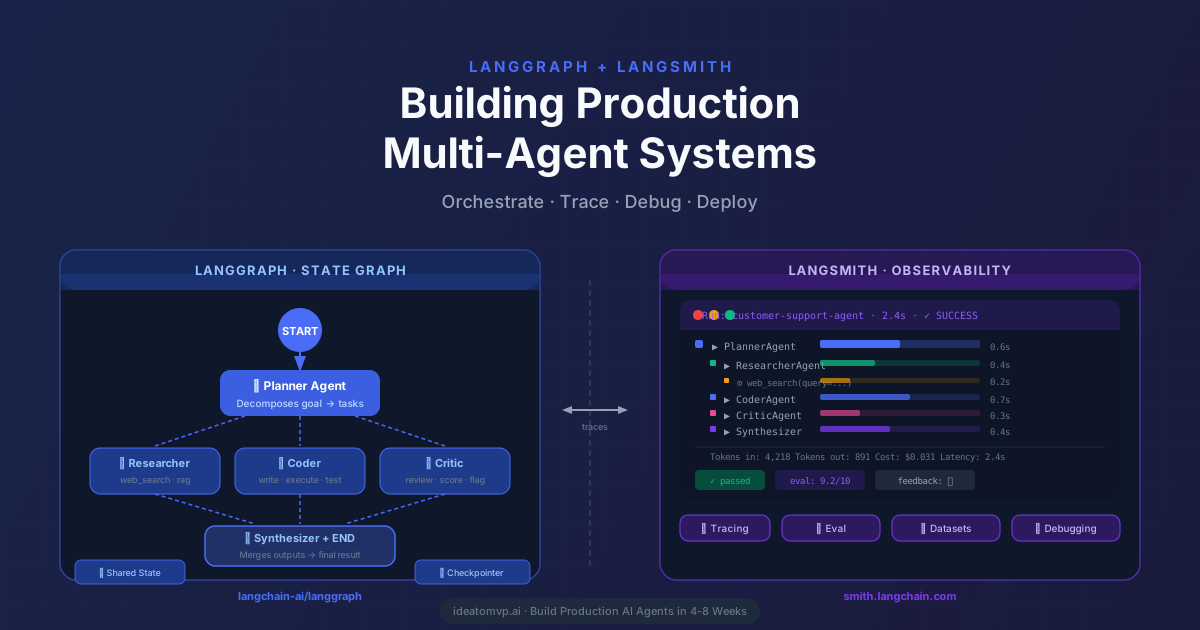
Most teams building AI agents hit the same wall. The demo works. The prototype impresses stakeholders. Then they push to production — and everything gets murky. Agents loop unexpectedly. Tool calls fail silently. Costs balloon. Nobody knows why a run failed because there's no visibility into what happened inside.
This guide solves both problems. LangGraph gives you stateful, controllable multi-agent orchestration that doesn't fall apart at scale. LangSmith gives you the observability layer to trace every run, evaluate every output, and debug every failure — in development and in production. Together, they're the production stack for serious agent systems.
LangChain's LCEL (LangChain Expression Language) chains are excellent for linear pipelines: input → prompt → LLM → output. But real agent systems aren't linear. They need:
LangGraph was built specifically for this. It models your agent workflow as a directed graph where nodes are functions (agents, tools, conditional checks) and edges define execution flow. State is a typed Python dict that gets passed and updated at every step. The checkpointer persists that state so you get memory, retry capability, and human interruption points for free.
pip install langgraph langsmith langchain-openai langchain-anthropic

# Set environment variables
export LANGCHAIN_TRACING_V2=true
export LANGCHAIN_API_KEY=ls__your_api_key_here
export LANGCHAIN_PROJECT=production-agents
export OPENAI_API_KEY=sk-your-key
Before writing a single agent, understand the four primitives everything else is built on.
A TypedDict that holds all data flowing through the graph. Every node reads from and writes to state. It's the single source of truth.
Python functions that receive state and return a partial state update. A node can be an LLM call, a tool execution, a conditional check — anything.
Connections between nodes. Can be fixed (always go to next node) or conditional (route based on state values — the routing logic is just a Python function).
Persist state between steps. SqliteSaver for development, RedisSaver or PostgresSaver for production. Enables memory, retries, and human-in-the-loop.
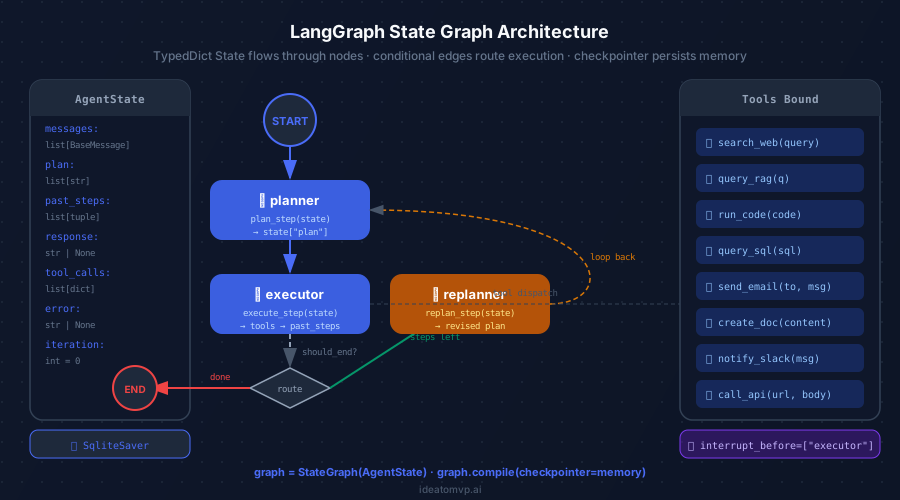
The Plan-and-Execute pattern: Planner decomposes the goal, Executor runs steps, a conditional router decides whether to replan or finish, Replanner revises if needed.
Here's a production-grade customer support agent that routes tickets, queries a RAG knowledge base, resolves autonomously, or escalates to a human — using LangGraph's full feature set.
from typing import TypedDict, Annotated, Sequence
from langchain_core.messages import BaseMessage
import operator

class SupportAgentState(TypedDict):
    # All messages in the conversation
    messages: Annotated[Sequence[BaseMessage], operator.add]
    # Classified ticket category
    category: str
    # Retrieved knowledge base docs
    kb_results: list[dict]
    # Generated resolution
    resolution: str | None
    # Whether ticket needs escalation
    needs_escalation: bool
    # Escalation reason if applicable
    escalation_reason: str | None
    # Final response sent to customer
    final_response: str | None
    # Confidence score (0-1)
    confidence: float
from langchain_openai import ChatOpenAI
from langchain_core.messages import HumanMessage, AIMessage
from langchain_core.prompts import ChatPromptTemplate

llm = ChatOpenAI(model="gpt-4o", temperature=0)

# Node 1: Classify the incoming ticket
def classifier_node(state: SupportAgentState) -> dict:
    prompt = ChatPromptTemplate.from_messages([
        ("system", """Classify this support ticket into one of:
        billing, technical, account, shipping, general
        Also assess confidence (0-1) that you can auto-resolve it.
        Return JSON: {{"category": "...", "confidence": 0.0}}"""),
        ("human", "{ticket}"),
    ])
    chain = prompt | llm
    ticket_text = state["messages"][-1].content
    result = chain.invoke({"ticket": ticket_text})
    parsed = parse_json(result.content)
    return {
        "category": parsed["category"],
        "confidence": parsed["confidence"],
    }

# Node 2: Query the RAG knowledge base
def rag_node(state: SupportAgentState) -> dict:
    query = state["messages"][-1].content
    # Your vector store query here (Pinecone, pgvector, etc.)
    results = vector_store.similarity_search(
        query, k=5, filter={"category": state["category"]}
    )
    return {"kb_results": [r.page_content for r in results]}

# Node 3: Generate resolution using retrieved context
def resolver_node(state: SupportAgentState) -> dict:
    context = "\n\n".join(state["kb_results"])
    prompt = ChatPromptTemplate.from_messages([
        ("system", f"""You are a support agent. Use this context to
        resolve the ticket. If you cannot resolve with high confidence,
        return null for resolution.\n\nContext:\n{context}"""),
        ("human", "{ticket}"),
    ])
    chain = prompt | llm
    result = chain.invoke({"ticket": state["messages"][-1].content})
    return {"resolution": result.content}

# Node 4: Human escalation node
def escalation_node(state: SupportAgentState) -> dict:
    return {
        "needs_escalation": True,
        "escalation_reason": (
            f"Low confidence ({state['confidence']:.0%}) — "
            f"routed to human agent"
        ),
        "final_response": (
            "We've escalated your ticket to a specialist "
            "who will follow up within 2 business hours."
        ),
    }

# Node 5: Format and send final response
def responder_node(state: SupportAgentState) -> dict:
    return {
        "final_response": state["resolution"],
        "messages": [AIMessage(content=state["resolution"])],
    }
from langgraph.graph import StateGraph, START, END
from langgraph.checkpoint.sqlite import SqliteSaver

# Conditional routing function
def route_after_classification(state: SupportAgentState) -> str:
    """Route based on category and confidence score."""
    if state["confidence"] < 0.7:
        return "escalate"  # Low confidence → human
    if state["category"] == "billing":
        return "escalate"  # Always escalate billing
    return "rag"           # High confidence → try auto-resolve

def route_after_resolution(state: SupportAgentState) -> str:
    """Check if resolution is good enough to send."""
    if state["resolution"] is None:
        return "escalate"
    if len(state["resolution"]) < 50:
        return "escalate"  # Too short, probably incomplete
    return "respond"

# Build the graph
builder = StateGraph(SupportAgentState)

# Add all nodes
builder.add_node("classifier", classifier_node)
builder.add_node("rag", rag_node)
builder.add_node("resolver", resolver_node)
builder.add_node("escalation", escalation_node)
builder.add_node("responder", responder_node)

# Add edges
builder.add_edge(START, "classifier")
builder.add_conditional_edges(
    "classifier",
    route_after_classification,
    {
        "rag": "rag",
        "escalate": "escalation",
    },
)
builder.add_edge("rag", "resolver")
builder.add_conditional_edges(
    "resolver",
    route_after_resolution,
    {
        "respond": "responder",
        "escalate": "escalation",
    },
)
builder.add_edge("responder", END)
builder.add_edge("escalation", END)

# Compile with checkpointer for persistent memory
memory = SqliteSaver.from_conn_string(":memory:")  # Use PostgresSaver in prod
graph = builder.compile(
    checkpointer=memory,
    interrupt_before=["escalation"],  # Human-in-the-loop checkpoint
)

# Run the graph
config = {"configurable": {"thread_id": "ticket-48291"}}
result = graph.invoke(
    {"messages": [HumanMessage(content="My invoice is wrong")]},
    config=config,
)
print(result["final_response"])
🔑 The power of thread_id
Every invocation with the same thread_id resumes from where the last run left off. The checkpointer handles this automatically. This is how you get multi-turn memory, long-running tasks, and the ability to pause and resume — without any custom session management code.
Multi-agent systems have a failure mode that doesn't exist in traditional software: they can appear to work while producing subtly wrong outputs. The code runs. No exceptions are thrown. But the agent classified the ticket incorrectly, retrieved irrelevant context, and sent a confident-sounding wrong answer to a customer. Without observability, you never find out.
LangSmith captures a complete trace of every run — every LLM call, every tool execution, every state transition, every token consumed. Set two environment variables and it starts working automatically with LangGraph (no instrumentation code required):
# These two variables are all you need to start tracing
export LANGCHAIN_TRACING_V2=true
export LANGCHAIN_API_KEY=ls__your_api_key

# Optional but recommended
export LANGCHAIN_PROJECT=customer-support-prod
export LANGCHAIN_ENDPOINT=https://api.smith.langchain.com

# That's it. Your LangGraph runs are now fully traced.
# No code changes required.
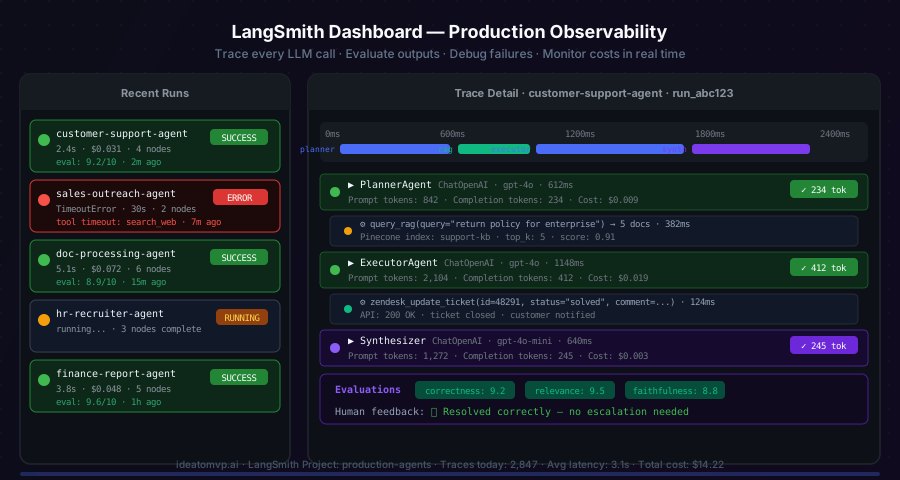
LangSmith traces every node, every tool call, and every LLM invocation — with token counts, latency, cost, and human feedback in one dashboard.
Tracing tells you what happened. Evaluation tells you how well it worked. LangSmith's evaluation framework lets you run scored evaluations against datasets, with either custom evaluators or LLM-as-judge scoring.
from langsmith import Client
from langsmith.evaluation import evaluate, LangChainStringEvaluator

client = Client()

# Create or use an existing dataset
dataset = client.create_dataset(
    dataset_name="support-tickets-v2",
    description="Golden set of 200 resolved support tickets",
)

# Add examples: input ticket → expected resolution
client.create_examples(
    inputs=[
        {"messages": [{"role": "user", "content": "How do I cancel my subscription?"}]},
        {"messages": [{"role": "user", "content": "My payment failed but I was charged."}]},
    ],
    outputs=[
        {"final_response": "To cancel, go to Settings → Billing → Cancel Plan."},
        {"final_response": "We've issued a refund. It will appear in 3-5 business days."},
    ],
    dataset_id=dataset.id,
)

# Define evaluators
correctness_evaluator = LangChainStringEvaluator(
    "criteria",
    config={"criteria": "correctness"},
    prepare_output_fn=lambda run, example: {
        "prediction": run.outputs.get("final_response", ""),
        "reference": example.outputs.get("final_response", ""),
    },
)

# Run evaluation against your compiled graph
def run_agent(inputs: dict) -> dict:
    config = {"configurable": {"thread_id": f"eval-{id(inputs)}"}}
    result = graph.invoke(inputs, config=config)
    return {"final_response": result.get("final_response", "")}

results = evaluate(
    run_agent,
    data=dataset.name,
    evaluators=[correctness_evaluator],
    experiment_prefix="gpt-4o-support-v3",
    num_repetitions=1,
)

print(f"Average correctness: {results.to_pandas()['feedback.correctness'].mean():.2f}")
For high-stakes actions — sending emails, processing refunds, updating CRM records — you want a human to approve before the agent acts. LangGraph's interrupt_before parameter pauses execution at any node and persists state via the checkpointer. Resume it later with a single call.
# Compile with human checkpoint before escalation
graph = builder.compile(
    checkpointer=memory,
    interrupt_before=["escalation"],  # Pause here for human review
)

config = {"configurable": {"thread_id": "ticket-48291"}}

# First run — graph pauses at "escalation" node
result = graph.invoke(
    {"messages": [HumanMessage(content="My invoice is wrong")]},
    config=config,
)
print("Graph paused. Current state:", result)
# → Graph stopped before escalation node

# Human reviews in your dashboard / Slack / UI...
# When approved, resume from the same thread_id:
graph.update_state(
    config,
    {"escalation_reason": "Human approved escalation — billing dispute"},
    as_node="escalation",
)

# Resume — graph continues from where it paused
final_result = graph.invoke(None, config=config)
print("Final response:", final_result["final_response"])
LangGraph supports streaming at three levels: token-level (characters as they're generated), event-level (node start/end events), and value-level (full state after each node). Use the right one for your UI.
# Stream tokens as they're generated (for chat UIs)
async for event in graph.astream_events(
    {"messages": [HumanMessage(content="Help me understand my bill")]},
    config=config,
    version="v2",
):
    kind = event["event"]

    if kind == "on_chat_model_stream":
        # Token-level streaming — send to frontend via SSE/WebSocket
        chunk = event["data"]["chunk"]
        if chunk.content:
            print(chunk.content, end="", flush=True)

    elif kind == "on_chain_start":
        # Node started — useful for progress indicators
        node_name = event["name"]
        print(f"\n[{node_name} started]")

    elif kind == "on_tool_start":
        # Tool call started
        tool_name = event["name"]
        inputs = event["data"]["input"]
        print(f"\n🔧 Using tool: {tool_name}({inputs})")

    elif kind == "on_chain_end":
        # Node completed — log duration
        node_name = event["name"]
        print(f"\n[{node_name} completed]")
SqliteSaver is great for local dev but doesn't work in distributed or serverless environments. Swap to PostgresSaver for multi-replica deployments. Both have identical APIs — one import change.
from langgraph.checkpoint.postgres import PostgresSaver
memory = PostgresSaver.from_conn_string(os.getenv('DATABASE_URL'))
Plan-and-execute agents can loop forever if the replanner never converges. Add an iteration counter to your state and a conditional edge that forces END after N iterations.
def should_continue(state):
    if state['iteration'] >= 10:
        return 'end'  # Force termination
    return 'continue'
Tag each run with the model version, prompt version, and feature flags. This makes it trivial to compare performance across experiments in the LangSmith UI.
config = {
    'configurable': {'thread_id': tid},
    'tags': ['gpt-4o', 'prompt-v3', 'prod'],
    'metadata': {'customer_tier': 'enterprise'}
}
Define your tools once and bind them to the LLM. LangGraph's ToolNode handles tool execution automatically, keeping node functions clean and testable in isolation.
from langgraph.prebuilt import ToolNode
tools = [search_web, query_rag, send_email]
llm_with_tools = llm.bind_tools(tools)
tool_node = ToolNode(tools)
Here's what a production LangGraph + LangSmith deployment looks like across the full stack:
| Layer | Tool | Why |
|---|---|---|
| Orchestration | LangGraph | Stateful graph execution, loops, branching, human-in-the-loop |
| LLM | GPT-4o / Claude 3.5 Sonnet | Best reasoning for complex agent tasks |
| Tool calls | LangGraph ToolNode | Auto-dispatches LLM tool calls to Python functions |
| Memory / State | PostgresSaver | Persists thread state across calls in production |
| RAG | Pinecone + pgvector | Vector search for knowledge base retrieval |
| Observability | LangSmith | Traces, evals, datasets, cost monitoring |
| API layer | FastAPI + SSE | Streams tokens to frontend, handles auth |
| Frontend | Next.js + Vercel AI SDK | AI SDK handles streaming response rendering |
| Queue | Redis / Celery | For long-running async agent tasks |
| Deployment | Railway / AWS ECS | Containerized FastAPI + LangGraph server |
→Customer support agent resolving 70%+ of tickets autonomously
→Sales outreach agent that researches, writes, and follows up
→Document processing pipeline with structured data extraction
→HR recruiter agent that screens, scores, and books interviews
→Financial report agent monitoring P&L and flagging anomalies
→Internal knowledge agent answering employee questions from docs
LangGraph solves the orchestration problem — stateful graphs, conditional routing, persistent memory, human checkpoints. LangSmith solves the production visibility problem — every trace, every evaluation, every failure surfaced and debuggable. Together they give you the control and observability needed to ship agent systems that actually work in production, not just in demos.
The two-environment-variable setup for LangSmith is one of the highest ROI changes you can make today. Zero code changes. Instant visibility into every agent run. If you ship AI agents and you're not using it, you're flying blind.
IdeaToMVP Academy
4-week live cohort for founders. Learn to ship AI agents, scope MVPs, and automate your business — taught by the same team that writes these guides.